• Skip to primary navigation
  • Skip to main content
  • Skip to footer

TECHXT

simple extendable solutions

  • Home
  • WordPress Tutorial
  • SEO
  • How to
  • Forum
  • Knowledge Base
    • Domain Name Generator
    • My Tech Projects
    • News
    • Security
  • About
  • Search
Home › Windows › Windows 7 Tricky Control Panel Shortcut
Windows

Windows 7 Tricky Control Panel Shortcut

By Bhanu Mahato

0

Windows 7 has a special control panel. To enable it create a folder named Control.{ED7BA470-8E54-465E-825C-99712043E01C}

The name of the folder i.e. Control in our example can be different but the extension .{ED7BA470-8E54-465E-825C-99712043E01C}  should be as it is.

Open the folder & see the magic. It has 280+ options.
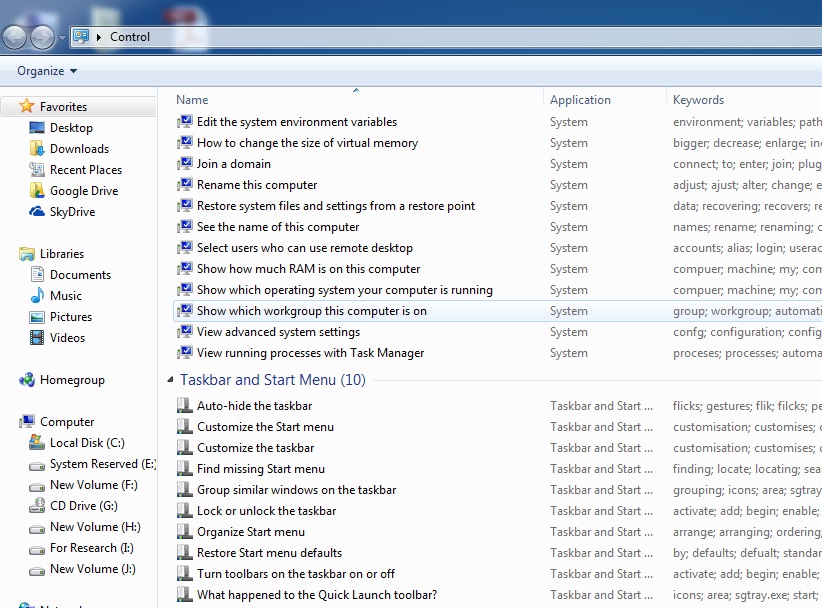
image016

Bhanu Mahato
View all posts by Bhanu Mahato
Bhanu Mahato's Website

Do you like this article?

control panel windows 7

About Bhanu Mahato

Follow me

Footer

Subscribe by email

FOLLOW US :

Tools & Apps

  • Domain Names Generator
  • Our Wordpress Plugins
  • HTML Code Table

TechXT Network

  • www.seecoupons.com – Just another Deals & Coupons site
  • pincodes.techxt.com – A search engine for Indian Pincode.
  • stdcode.techxt.com – A search engine for Indian STD Codes
  • mobileinfo.techxt.com – A search engine for Indian Mobile Codes
  • bankifsccode.techxt.com – A search engine for Indian Bank IFSC Codes.

Info

  • Contact us
  • Privacy Policy

  •   simple extendable solutions

© Copyright 2025 TECHXT.COM

We use cookies to ensure that we give you the best experience on our website. If you continue to use this site we will assume that you are happy with it.
