

Many of us are not aware of but Google has a Safe browsing API through which you can check any domain name for malwares or phishing site. Google maintains a constantly updated list of sites which was reported as containing malware or was reported as phishing site. You can easily check any domain to see if that site contains a malware or not.
There is no official page by Google from where you can directly check a site for malware. To check a site against the Google’s maintained list, just put the below link on your browsers address bar changing the example.com in the below URL to the domain name that you want to check.
http://www.google.com/safebrowsing/diagnostic?site=example.com
Or you can use the below form to check a site.
So how reliable is this and what is the use?
This test is definitely important if you are planning to buy an existing or an expiring domain from an auction. Though once you buy a domain and plan to change the content of the site, then you might not have any problem in the long run but in the short period when you start the new site, Google will still mark your site as a malware site. The list that Google maintains is updated overtime and not instantly as and when the ownership of the domain or the content of the site changes.
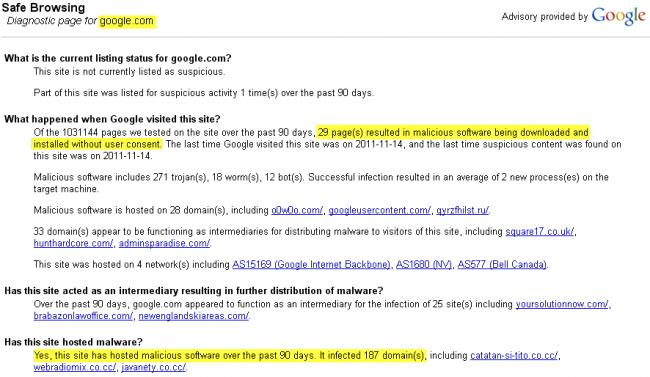
I have noted one flaw in Google safe browsing is that it marks domain to contain malware if a subdomain is found to contains malware. Like if you search for Blogger.com or Google.com, for malware then it will definitely show that these sites contains malware. So why is that? The simple answer is since both the sites gives its users to create subdomain. Like a person can use xyz.blogspot.com or use google sites to host malware. Thousands of people are hosting thousands of sites everyday on these free services. So if you want to know if a particular subdomain contains malware or not then check that subdomain for malware and not the main domain. If you want you can even check a specific page of a site.
Google.com checked for malware

Do you like this article?


