
• Skip to primary navigation
  • Skip to main content
  • Skip to footer

TECHXT

simple extendable solutions

  • Home
  • WordPress Tutorial
  • SEO
  • How to
  • Forum
  • Knowledge Base
    • Domain Name Generator
    • My Tech Projects
    • News
    • Security
  • About
  • Search
Home › Internet › Social Media › Facebook › How to hide your Friends list on Facebook
Facebook

How to hide your Friends list on Facebook

By Sudipto

0

Facebook friends list is visible to everyone by default. Facebook gives you the option to turn off this feature and hide your friends list from everyone or from a specific list of persons. So if you want to hide your friends list from everyone then check the steps below

Step 1: Login to your Facebook account and goto the Friends tab (Facebook Friends)

Step 2: Click Edit > From the drop down select Only Me.

That all that you need to do. Now no one will be able to see your friends list.

Facebook also gives you the flexibility to hide your friends list from a specific list of person or show your friends to some specific list of persons. So here is how to do it–

Step 1: Login and goto your friends tab (Facebook Friends)

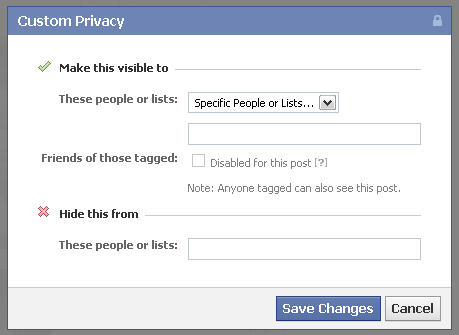
Step 2: Click Edit > From dropdown click Custom

Step 3: If you want to show your friends list to a specific list of person then from “Make this visible to”  section of the popup, select “Specific People or Lists..” and add the names of your friends to whom you want to show your friends list.

Step 4: If you want to hide your friends list from some of the friends added to your friends list then add those list of friends to “Hide this from” section of the popup.

Step 5: Click Save changes to save the changes made.
 

I am the founder and developer at TECHXT. Over the decade I have helped hundreds build their own site. All plugins I develop are made have a common goal: Make it as simple as possible and as easy to use as possible.
Sudipto
View all posts by Sudipto
Sudipto's Website / Google+

Do you like this article?

Facebook hide friends

About Sudipto

I am the founder and developer at TECHXT. Over the decade I have helped hundreds build their own site. All plugins I develop are made have a common goal: Make it as simple as possible and as easy to use as possible.

Follow me

Footer

Subscribe by email

FOLLOW US :

Tools & Apps

  • Domain Names Generator
  • Our Wordpress Plugins
  • HTML Code Table

TechXT Network

  • www.seecoupons.com – Just another Deals & Coupons site
  • pincodes.techxt.com – A search engine for Indian Pincode.
  • stdcode.techxt.com – A search engine for Indian STD Codes
  • mobileinfo.techxt.com – A search engine for Indian Mobile Codes
  • bankifsccode.techxt.com – A search engine for Indian Bank IFSC Codes.

Info

  • Contact us
  • Privacy Policy

  •   simple extendable solutions

© Copyright 2025 TECHXT.COM

We use cookies to ensure that we give you the best experience on our website. If you continue to use this site we will assume that you are happy with it.
