• Skip to primary navigation
  • Skip to main content
  • Skip to footer

TECHXT

simple extendable solutions

  • Home
  • WordPress Tutorial
  • SEO
  • How to
  • Forum
  • Knowledge Base
    • Domain Name Generator
    • My Tech Projects
    • News
    • Security
  • About
  • Search
Home › Internet › Social Media › Facebook › How to delete your Facebook account
Facebook

How to delete your Facebook account

By Sudipto

0

Facebook is the best and the most used social networking site. But sometimes  you feel the need to delete your Facebook account. But Facebook does not give you any direct options to delete your account.

Delete Facebook account permanently

First login to your Facebook account and go to the below URL. Fill up the form and your Facebook account will be deleted.

https://www.facebook.com/help/contact.php?show_form=delete_account

Account once deleted cannot be recovered back. So before Filling up the account deletion form you can take a backup of your Facebook posts and other data, just in case you need them in future.

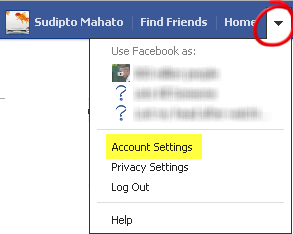
To take a backup of your data goto Account settings > General > Download a copy of your Facebook data.

Deactivate Facebook Account

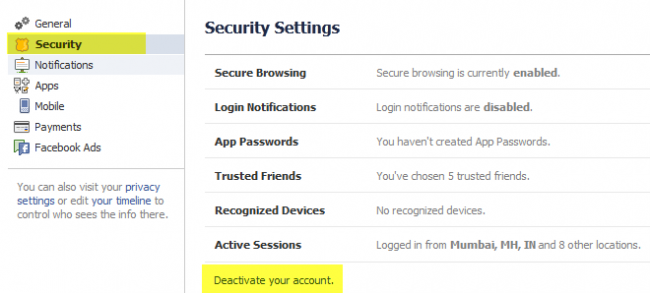
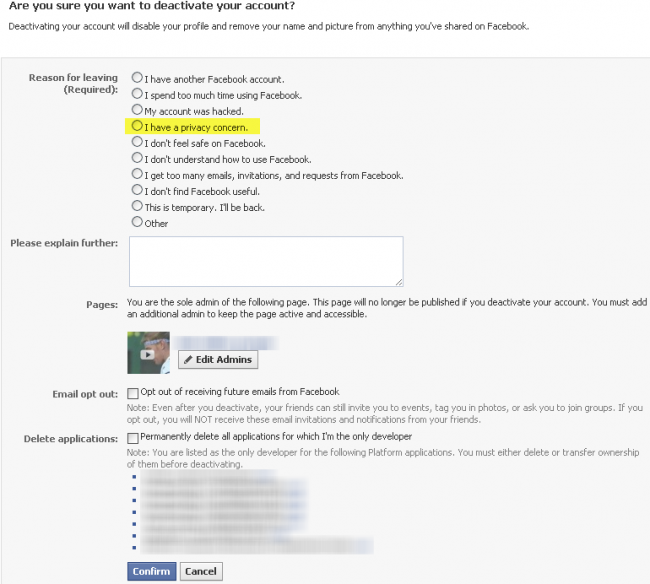
Facebook also gives you an option to deactivate your Facebook account. Deactivating will be same as deleting your Facebook account accept that later on if you want you can reactivate it and start using your account again. This option will make your account temporarily unavailable to your friends and others till you reactivate your account.

To deactivate your account goto Account settings > General > Deactivate your account.

Check out the below images for further reference


I am the founder and developer at TECHXT. Over the decade I have helped hundreds build their own site. All plugins I develop are made have a common goal: Make it as simple as possible and as easy to use as possible.
Sudipto
View all posts by Sudipto
Sudipto's Website / Google+

Do you like this article?

delete facebook account

About Sudipto

I am the founder and developer at TECHXT. Over the decade I have helped hundreds build their own site. All plugins I develop are made have a common goal: Make it as simple as possible and as easy to use as possible.

Follow me

Footer

Subscribe by email

FOLLOW US :

Tools & Apps

  • Domain Names Generator
  • Our Wordpress Plugins
  • HTML Code Table

TechXT Network

  • www.seecoupons.com – Just another Deals & Coupons site
  • pincodes.techxt.com – A search engine for Indian Pincode.
  • stdcode.techxt.com – A search engine for Indian STD Codes
  • mobileinfo.techxt.com – A search engine for Indian Mobile Codes
  • bankifsccode.techxt.com – A search engine for Indian Bank IFSC Codes.

Info

  • Contact us
  • Privacy Policy

  •   simple extendable solutions

© Copyright 2025 TECHXT.COM

We use cookies to ensure that we give you the best experience on our website. If you continue to use this site we will assume that you are happy with it.