
• Skip to primary navigation
  • Skip to main content
  • Skip to footer

TECHXT

simple extendable solutions

  • Home
  • WordPress Tutorial
  • SEO
  • How to
  • Forum
  • Knowledge Base
    • Domain Name Generator
    • My Tech Projects
    • News
    • Security
  • About
  • Search
Home › How to › How to change the default search engine of Firefox address bar
How to

How to change the default search engine of Firefox address bar

By Sudipto

0

Firefox comes with a search box which gives you the ability to search directly form there with even have to open a search engine. But the same thing can be done using the address bar too. Normally for the address bar the default search engine is either not set or is set to Bing. So if the search engine is not set for the address bar of if you want to change the default search engine to a search engine of your choice then here is how to do it.

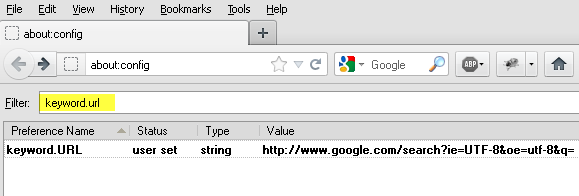
Enter about:config in the address bar and hit enter. A warning page will be displayed. Press the I’ll be careful, I promise! button.  Enter keyword.url in the filter. It will display the keyword.URL setting with value of the default search engine for the address bar. If the value is blank then it means that there is current no default search set for the address bar.

To change the value, double click on keyword.URL. A dialog will open which will prompt you the value to be changed to. Enter  http://www.google.com/search?ie=UTF-8&q=

This you change the default search engine of the address bar to Google. Now you will be able to search anything directly form the address bar same as Google Chrome. If you want to change the default to some other search engine other than Google then check out the list below.
  • Google Default: http://www.google.com/search?ie=UTF-8&q=
  • Google Browse By Name: http://www.google.com/search?ie=UTF-8&sourceid=navclient&gfns=1&q=
  • Google I’m Feeling Lucky: http://www.google.com/search?ie=UTF-8&btnI=&q=
  • Yahoo Search: http://search.yahoo.com/search?p=
  • Bing Search: http://www.bing.com/search?q=
  • Ask: http://www.ask.com/web?q=


I am the founder and developer at TECHXT. Over the decade I have helped hundreds build their own site. All plugins I develop are made have a common goal: Make it as simple as possible and as easy to use as possible.
Sudipto
View all posts by Sudipto
Sudipto's Website / Google+

Do you like this article?

address bar firefox

About Sudipto

I am the founder and developer at TECHXT. Over the decade I have helped hundreds build their own site. All plugins I develop are made have a common goal: Make it as simple as possible and as easy to use as possible.

Follow me

Footer

Subscribe by email

FOLLOW US :

Tools & Apps

  • Domain Names Generator
  • Our Wordpress Plugins
  • HTML Code Table

TechXT Network

  • www.seecoupons.com – Just another Deals & Coupons site
  • pincodes.techxt.com – A search engine for Indian Pincode.
  • stdcode.techxt.com – A search engine for Indian STD Codes
  • mobileinfo.techxt.com – A search engine for Indian Mobile Codes
  • bankifsccode.techxt.com – A search engine for Indian Bank IFSC Codes.

Info

  • Contact us
  • Privacy Policy

  •   simple extendable solutions

© Copyright 2025 TECHXT.COM

We use cookies to ensure that we give you the best experience on our website. If you continue to use this site we will assume that you are happy with it.
