

 In this article I will show you how to add a footer widget area in Thesis theme for WordPress. The objective of this article is to create three footer widget areas with minimal code required. So let see how to get our footer widget area. The following code will creates 3 footer widget area. I have add the required CSS code to arrange the widget areas. You can add your own CSS to adjust the styling and color if the background and text.
Update: Check out this Ultimate Thesis Options Plugin. This will help you customize your Thesis Theme too easily. Like centering menu, Right Align menu, adding a second menu, adding Footer widget areas and many more options.
The code to create the footer widget area
The below code creates a 3 column footer widget area. Put this just after the first line of your custom_functions.php file i.e just after <?php
//Add hook to thesis footer to display the Widgetized footer
add_action('thesis_hook_footer', 'customFooter');

//3 column footer widget area
function customFooter() {
?>
<div id="footerwrap">
<div>
<ul>
<?php if ( !function_exists('dynamic_sidebar') || !dynamic_sidebar('Footer1')){ } ?>
</ul>
</div>
<div>
<ul>
<?php if ( !function_exists('dynamic_sidebar') || !dynamic_sidebar('Footer2')) { }?>
</ul>
</div>
<div>
<ul>
<?php if ( !function_exists('dynamic_sidebar') || !dynamic_sidebar('Footer3')){ } ?>
</ul>
</div>
<div id="clear"></div>
</div>
<?php
}

//Register the footer widget areas
register_sidebar(array('name'=>'Footer1','before_title'=>'<h3>','after_title'=>'</h3>'));
register_sidebar(array('name'=>'Footer2','before_title'=>'<h3>','after_title'=>'</h3>'));
register_sidebar(array('name'=>'Footer3','before_title'=>'<h3>','after_title'=>'</h3>'));

Styling the code
.custom .footercol {
    float: left;
    padding: 10px;
    text-align: left;
    width: 31%;
}
.custom #footer {
    background: none repeat scroll 0 0 #DDDDDD;
    border-top: 2px solid #888888;
    text-align: center;
}
Where to Insert the code
All you need to do is copy the code to create the footer widget area in your custom_functions.php file of your Thesis theme and copy the styling code in your custom.css file.
Steps
- Login to your WordPress Dashboard
- Goto Thesis > Custom File editor
- Paste the styling CSS in custom.css file and save it
- Select custom_functions.php file from the drop down and paste the code to create the footer here and then save it
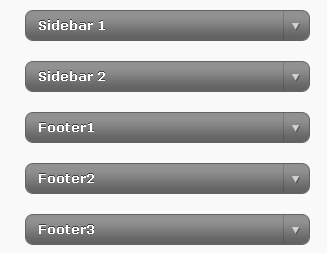
- Now if you go to Appearance > Widgets, you will see that 3 extra widget area has been created names Footer1, Footer2 and Footer3

Do you like this article?


