• Skip to primary navigation
  • Skip to main content
  • Skip to footer

TECHXT

simple extendable solutions

  • Home
  • WordPress Tutorial
  • SEO
  • How to
  • Forum
  • Knowledge Base
    • Domain Name Generator
    • My Tech Projects
    • News
    • Security
  • About
  • Search
Home › Wordpress Tutorial › How to add footer widget area in Atahualpa Theme for Wordpress
Wordpress Tutorial

How to add footer widget area in Atahualpa Theme for WordPress

By Sudipto

0

Atahualpa the best free theme I have come across. Every aspect of the design is customizable from the theme options. Here I will discuss how to add widget area in Atahualpa theme. I am using Atahualpa theme on this site so if you scroll down you will see I have widgets placed in the footer. By default Atahualpa does not come with footer widget area. So this is how you should create footer widget area in Atahualpa.

P.s. This tutorial only applies to Atahualpa theme for wordpress

The code that creates the widget area

<?php bfa_widget_area('name=FooterWid&cells=3&align=8&align_2=8&align_3=8&before_widget=<div id="%1$s">&after_widget=</div>'); ?>

Understanding the code
bfa_widget_area( //The function that creates the widget area
‘name=FooterWid& //Name of the widget area
cells=3& //Numbers of columns
align=8& //Alignment of the columns (default alignment)
align_2=8& //Alignment of the second column
align_3=8& //Alignment of the third column
before_widget=<div id=”%1$s”>& //HTML Tags to be added before every widget
after_widget=</div> //HTML Tags to be added after every widget
‘);

Thus we can understand that the above code is for creating three column widget area. If you need more or less column then change the cells value to a number of your choice.

Where to add the code

From your wordpress dashboard goto

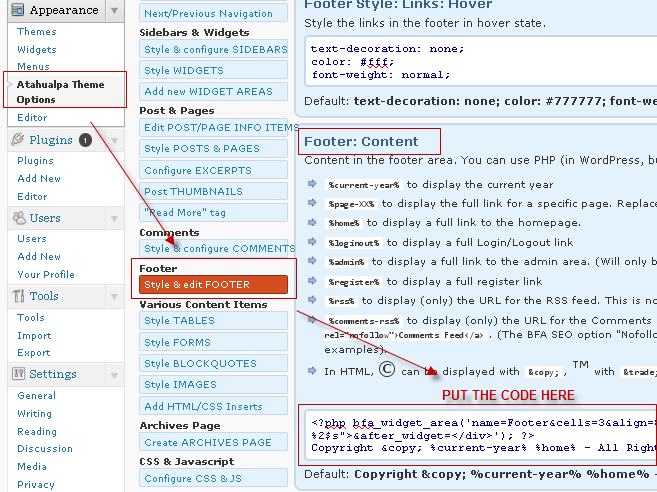
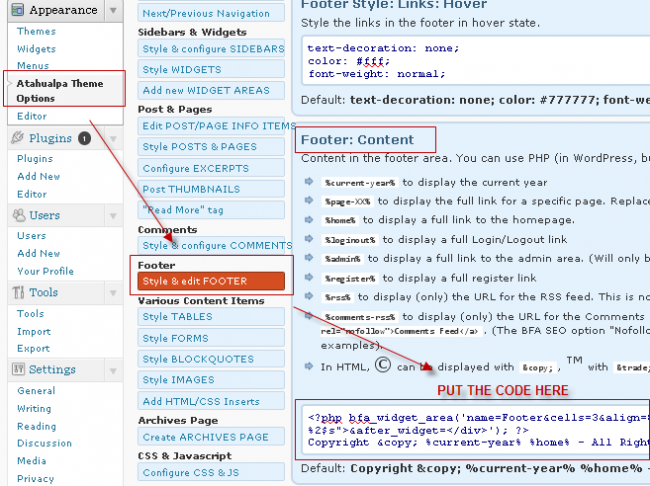
Appearance > Atahualpa Theme Options > Style & Edit FOOTER

Put the code under the Footer :  Content section then save it. After saving refresh your website two to three times. After refreshing your website if you goto Appearance > Widgets, you will see three new widget area is created. These are the footer widget areas that you just created.
I am the founder and developer at TECHXT. Over the decade I have helped hundreds build their own site. All plugins I develop are made have a common goal: Make it as simple as possible and as easy to use as possible.
Sudipto
View all posts by Sudipto
Sudipto's Website / Google+

Do you like this article?

Atahualpa theme footer widget

About Sudipto

I am the founder and developer at TECHXT. Over the decade I have helped hundreds build their own site. All plugins I develop are made have a common goal: Make it as simple as possible and as easy to use as possible.

Follow me

Footer

Subscribe by email

FOLLOW US :

Tools & Apps

  • Domain Names Generator
  • Our Wordpress Plugins
  • HTML Code Table

TechXT Network

  • www.seecoupons.com – Just another Deals & Coupons site
  • pincodes.techxt.com – A search engine for Indian Pincode.
  • stdcode.techxt.com – A search engine for Indian STD Codes
  • mobileinfo.techxt.com – A search engine for Indian Mobile Codes
  • bankifsccode.techxt.com – A search engine for Indian Bank IFSC Codes.

Info

  • Contact us
  • Privacy Policy

  •   simple extendable solutions

© Copyright 2025 TECHXT.COM

We use cookies to ensure that we give you the best experience on our website. If you continue to use this site we will assume that you are happy with it.
