Scrolling Social Sharebar Plugin

About the plugin

A scrolling social sharebar scrolling plugin with just 7 social icons (Twitter, FB Like, Google +1, Linkedin, FB Share, Stumbleupon and Addthis) and many more buttons that you can add using custom button option.

Features of the plugin

  • Option to add your own custom buttons
  • Very simple options to adjust the plugin as per your site design
  • Options to disable buttons that you don’t need.
  • Very simple design.
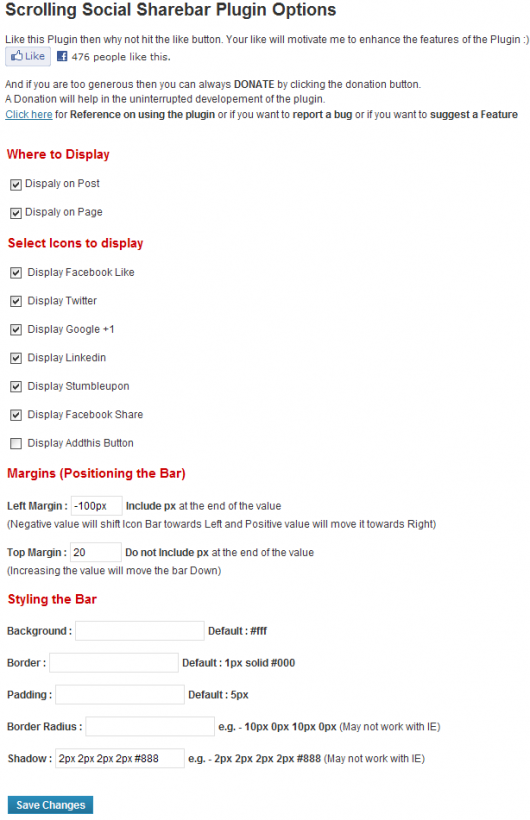
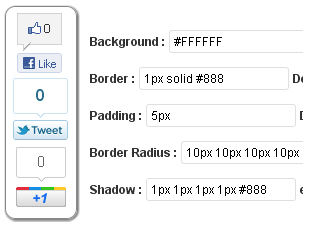
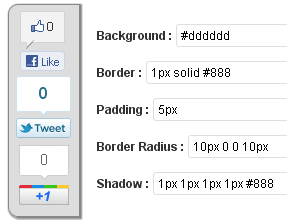
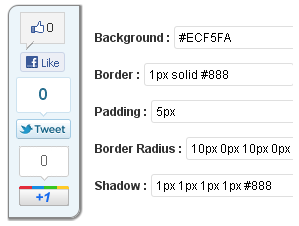
  • Options to change the background color, padding, border, border-radius and shadow.

Below you can see some of the plugin screenshots and some styling examples

Download Link

http://wordpress.org/extend/plugins/scrolling-social-sharebar/

Screenshots
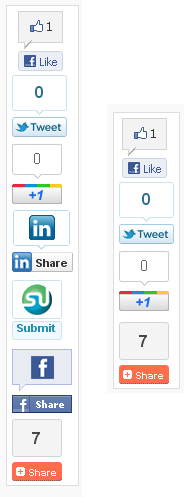
Demo Page


Some Styling Examples

  • http://www.facebook.com/daveaball Dave Ball

    cant seem to get the facebook share button to work , http://www.daveballonline.com

  • MarkF

    It either scrolls over my content or not at all. How do I get it to scroll on the side of the content?? I adjusted the px, but it just disappears as it goes to the left of the content.

  • Mel Lange

    Shows up on all pages EXCEPT Home page!!!

    • http://letusbuzz.com sudipto

      option to display on home page will be added soon

  • sourav

    not displaying on home page

    • http://letusbuzz.com sudipto

      wait for the next update. Display on home page option will be there

  • http://www.winsonyeung.com/ Winson Yeung

    just updated the plugin, the homepage is now displaying correctly!

  • http://www.nobordersmagazine.org Rachele

    guys, any idea why the plugin is being displayed also in my better-related-links for every post? it never happened before and i have no idea how to fix it

  • Heathglen

    any way to add pinterest?

    • http://letusbuzz.com sudipto

      well not on this version but the good news is that i will be updating the plugin within few days and will be add pinterest

  • http://twitter.com/ShellMyBel Michela Quilici

    Since I updated my plugin the last time, I noticed when I share my post via LinkedIn, it’s not pulling in the meta description from my All in one SEO plugin like it used to. Instead it just says ‘share’. Any suggestions on how to fix? Or is this a bug?

    • http://letusbuzz.com sudipto

      please post your site URL.

  • http://www.facebook.com/samirpatnaik Samir Patnaik

    The plugin is not coming from the top part of the screen. You can check http://www.onedirectionsonglyrics.com/. It needs to come from top not from middle. Any suggestion for fixing it.

    • http://letusbuzz.com sudipto

      I did not understand “Top part of the screen”. There are two animation styles one is Fixed, the one that you are using and the other one is the animated. Check out the animated version of the scroll. Goto the plugin option and change the scrolling type

  • prabhjot

    can we remove counting boxes and remains only buttons..

    • http://letusbuzz.com sudipto

      current the plugin do not have an option to show only buttons without count. But I will add the option soon

  • moelwyn

    Hello, I have included page number ID’s with commas to remove from certain pages but the sharebar is still showing. What is an ID? I assumed page number. I’m using wordpress 3.5.1 with twenty twelve theme.

    Thanks

    • http://letusbuzz.com sudipto

      ID is the unique number that wordpress assigns to every post and pages. if you edit a page or post on the addressbar the link shows something like this

      xyz_com/wp-admin/post.php?post=495&action=edit

      in the above example the number 495 is the ID of the post

  • http://www.freescrabbledictionary.com/ Cesar Bielich

    Any reason why i can’t get this plugin to display on posts even though I have it set to display on posts? I am having that same problem with both this plugin as well as Tweet, Like, Google +1 and Share

    • http://letusbuzz.com sudipto

      please post your site URL

      • http://www.freescrabbledictionary.com/ Cesar Bielich

        I already fixed it, it was http://www.dinaradvice.com

        • Rashik

          How did you make it to appear on your home page?

  • Sportedia

    I’m having a few issues with the bar appearing multiple times on the page and I can’t get it to show at the top. Please can you take a look: http://www.sportedia.co.uk

    • http://letusbuzz.com sudipto

      can you tell me what theme and plugins that you are using. I need to check compatibility issues. If you want to keep the details confidential then email me at [ sudipto [at] techxt.com ] .Also mention the version of the theme and plugins

      • Sportedia

        Great, thank you – I’ve just sent you an email.

  • Paul

    I have activated the scrolling bar widget and completed the settings page. The scrolling bar does not appear on my home page, http://www.buckscountyandbeyond.com, and appears too low on my page and posts pages. Any suggestions on what I can do to fix this. Thanks

  • Rashik

    Not appearing on my homepage!

    • http://letusbuzz.com sudipto

      please post your site url and also check that the option display on homepage is checked

  • madcat2

    Have done http://nepalclimbing.com/ Thanks..

  • http://www.lmimp.com/ Ragers

    Hi, plugin working good, just got an issue, i’ve got an infinite scroll page, and when it opens up the next feed line, it creates a new instance of the sharebar. Please help, this is an issue. :/ see at http://www.lmimp.com/

    • http://letusbuzz.com sudipto

      add the below CSS in your theme style.css and I think the problem will be resolved

      #primary > #content > .post:nth-of-type(1) > .entry-content > .scrollbarbox {
      display: block !important;
      }
      #primary .entry-content .scrollbarbox {
      display: none;
      }

      • http://www.lmimp.com/ Ragers

        nope, sorry not working.

        • http://letusbuzz.com sudipto

          for me its working on firefox and chrome. I did not test it on IE as i dont have that

          • http://www.lmimp.com/ Ragers

            OH WOW, my appologies. forgot about the browser cache. :) working thanks!

          • http://letusbuzz.com sudipto

            enjoy :)

  • http://twitter.com/TheBodyMaster Ron Russell

    The bar will only show up on top of the posting area, it disappears when I move it over the background to the left of the posts or pages. The site is http://thebodymaster.com

    • http://letusbuzz.com sudipto

      can you leave the plugin activated and move it over the background. I would like to check. Basically this happens when some element has overflow:hidden attribute added in CSS. This attribute hides any element that is not inside that element.

  • _yasin

    You can add pinterest button as follows

  • speters150

    I’ve tinkered with your plugin’s CSS and got it to show the Twitter and Google+ count boxes on the right, however I’m having a more difficult time getting the count box on the right for Facebook. Instead of a count box like the other two, I get a ‘Be the first of your friends…’

    Is there a possibility of adding more functionality to this plugin, such as top count, side count, small icon, medium, etc.

    This is the only issue I’m having with an otherwise great plugin.

    A specific page that has the plugin featured is: http://www.dfwcollegesportsbeat.com/dbu-belts-3-homers-to-take-game-1/ as I only have posts enabled.

  • http://kikoyandfriends.com/ Christopher R. De Guzman

    Hi, Is there a way to fix this? http://kikoyandfriends.com/news-alerts/support-for-windows-xp-and-office-2003-ends i set this bottom margin to 1600 but when i took look at the otther page, i realize that the bottom margin is different from other page. specially when there is a comment. how can i lock-in the floating share bar just in the content section? thanks!