
Blogger 301 Redirect Plugin for WordPress

This plugin is used for one to one mapping of post after migration from blogger blog to WordPress self hosted blog. This plugin is very helpful in keeping the traffic of your blogger blog and redirect them to appropriate wordpress blog posts. This plugin helps you in SEO after migration.

Features of the plugins

  • Advance search and redirect if you did not use the blogger import plugin to inport your blog posts from Blogger
  • Do not redirect to homepage option (Used in case you are using other plugins to take care of your 404 page not found errors)
  • Redirect Blogger Post feeds to WordPress feeds
  • Redirect Blogger Comment feeds to WordPress feeds
  • Redirect Blogger archives pages to WordPress
  • Display statistic of successful redirection by this plugin
  • Supports both custom domains as well as blogspot.com domain names

Plugin Forum

Please post any bugs or feature request in the Forum. Create a new topic there. This help in keeping track of the bugs and requests and also helps other users with similar problem.

sp

From where to Download the Plugin

You can download the latest version form WordPress repository

http://wordpress.org/extend/plugins/blogger-301-redirect/

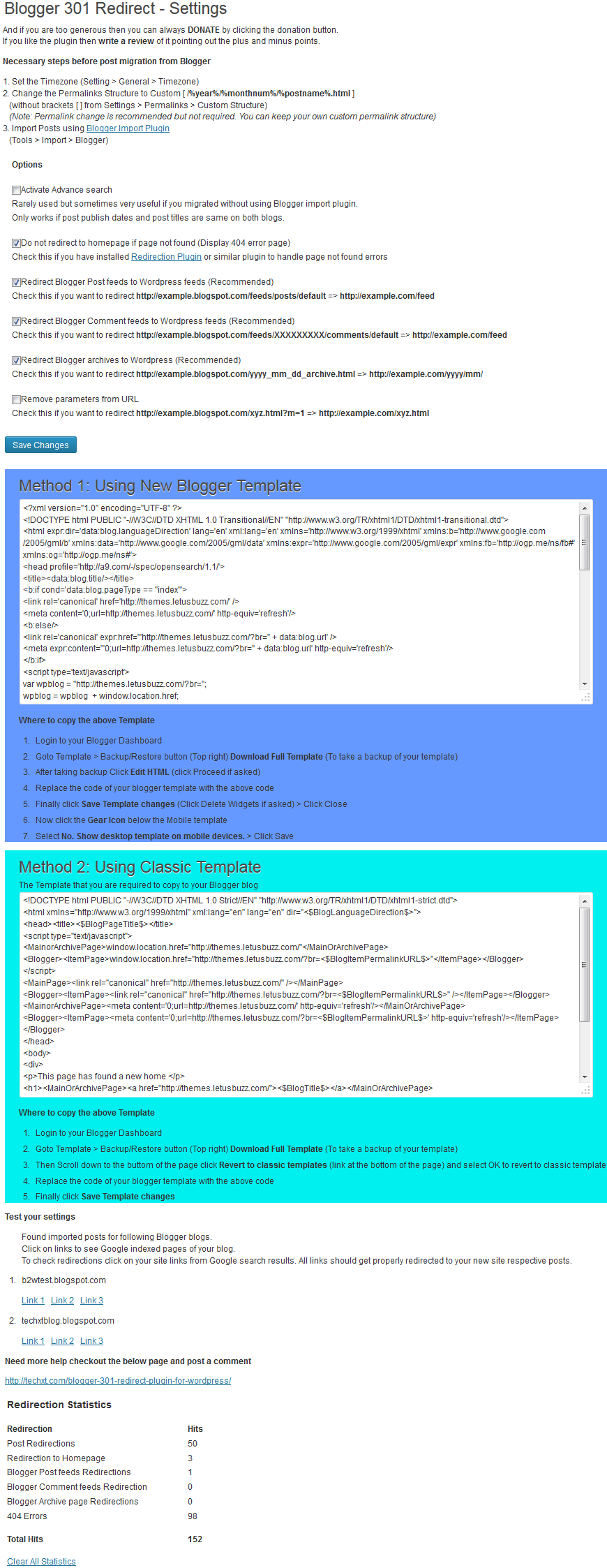
Where to copy the above Template

Method 1: Using New Blogger template

  1. Login to your Blogger Dashboard
  2. Goto Template > Backup/Restore button (Top right) Download Full Template (To take a backup of your template)
  3. After taking backup Click Edit HTML (click Proceed if asked)
  4. Replace the code of your blogger template with the above code
  5. Finally click Save Template changes (Click Delete Widgets if asked) > Click Close
  6. Now click the Gear Icon below the Mobile template
  7. Select No. Show desktop template on mobile devices. > Click Save

Method 2: Using Classic Blogger template

  1. Login to your Blogger Dashboard
  2. Goto Template > Backup/Restore button (Top right) Download Full Template (To take a backup of your template)
  3. Then click Revert to classic template (link at the bottom of the page) and select OK to revert to classic template
  4. Replace the code of your blogger template code with the template code from the plugin’s options page
  5. Finally click Save Template changes

Screenshots
blogger301blogger301-2

Documentation and F.A.Q

Well this section is dynamic and I will keep on updating this based on the questions asked in case you are unable to use the plugin. Feel free to post a comment if any help is required or if you found a bug in the plugin. I would also like your suggestions, feedback and feature requests so that I can add the features as requested.

And thankyou so much for trying this plugin. Don’t forget to hit the like button if you like this plugin.

  • David Annobil-Dodoo

    Hi, Im logging into my blogger dashboard and I cannot see a DESIGN tab.

    What shall I do?

    Thanks

    • http://letusbuzz.com sudipto

      the option to revert to classic template has been moved to Templates ( Scroll to the bottom)

  • http://www.mabelandmilo.com MrsMummyslife

    HI, this template doesn’t seem to work, I get this message when i try to save it: Error parsing XML, line 1, column 182: The value of attribute “dir” associated with an element type “null” must not contain the ‘<' character.

    can you please fix this? Save templatePreviewClear editsClose

    • http://letusbuzz.com sudipto

      I think you did not revert to classic template. Anyways I updated the plugin and the template. Try using the new template.

      • http://www.mabelandmilo.com MrsMummyslife

        Done it, it worked. Thanks so much for your reply.

  • John

    Hi!
    Thanks for this wonderful plugin. It works superb on PC. But, on mobile phone, it gives 404 errors. I don’t know why, but please do help me check it. My website address is Nigerius (dot) com

    • http://letusbuzz.com sudipto

      I think you are using the Method 1 template… If so then you forgot to change the mobile template to same as desktop

      • John

        I did that. This is how I solved the problem for the benefit of others. Instead of using the New Blogger Template Code, I Reverted To Classic Template and Copied The Code for Classic. Now, the Mobile works. But, the date archives which was working before now redirects to the homepage. Maybe there is a misplacement of logic somewhere in the second code I am using now.

        I am checking to see if I can find, but if you do before me, please help. Thanks!

  • MP

    Hi,

    I am getting a lot of 404 errors. Nothing is redirecting. I am using a redirection plugin as well, so maybe my settings are incorrectly set? I used the new blogger template, should I have used classic? When I click on your links (3) and then pick a URL it sends me to my new home page with the (404) page not found. Thanks for your help.

    MP

    • http://letusbuzz.com sudipto

      can you post your site URl — both wordpress and blogger. I would like to have a look. Did you try the classic template as well. Are you getting redirected properly using classic template?

      • MP

        I installed the classic template and it seems to be working. For some reason, I have no idea, the new blogger template didn’t work. I followed the directions the same way, but newer version didn’t work for me. Everything now looks good. Thanks!

    • http://www.beingbritishisawesome.co.uk/ BeingBritishIsAwesome

      Having the exact same problem — just to homepage with ‘page not found’

      • http://www.beingbritishisawesome.co.uk/ BeingBritishIsAwesome

        Oh and I reverted to the classic template and used instructions for that. Nope. Still not working.

  • yourarnav

    Buddy it works for me but everyone else gets a 404 error. My wordpress domain – micromkv.com , my blogger domain – http://micromkvs.blogspot.com/ please help me!

  • diane

    I need a plugin that will take my post from wordpress and repost it my old blogger page so I don’t have to copy and paste the html each time. Do you have a plugin that does this? I can’t find one on the plug in search on WP.org

  • http://www.beingbritishisawesome.co.uk/ BeingBritishIsAwesome

    It doesn’t work. Blogger won’t even accept it. Every time I try to change the template HTML, I get a message that says – Error parsing XML, line 1, column 182: The value of attribute “dir”
    associated with an element type “null” must not contain the ‘<'
    character.

  • Amanda

    Hi, My homepage is redirecting but the others are going to 404 not found. Please help.
    http://www.cupcakesandcorndogs.com

  • Santhosh Kumar

    HI, I have solved my problem, It works great — I have small question, Is this

    “Blogger 301 Redirect Plugin” takes care of “Canonical Tag” Please help

    • http://letusbuzz.com sudipto

      yes it does take care of canonical tag. If you see the template that you have inserted in your blogger blog, you will see that link rel=”canonical” has been added to the template

  • KPC

    Hi,
    The redirection gives a ’403 – Forbidden’ error. The message got is ‘ Forbidden, You don’t have access /blog/ on this sever.

    Additionally a 404 not found error was encountered.’

    P.S. ‘/blog/’ is the wp installation directory.
    Any help is appreciated.

    Thanks
    PC

    • http://letusbuzz.com sudipto

      please post your site url. I would like to have a look.

      • PC

        blogger url – kerala-listings.blogspot.com to be redirected to http://www.keralalistings.com/blog/

        The blog home page is getting redirected, but individual posts gives error as mentioned above.

  • aszy

    Hi, how can I redirect my blogger blog to a directory in my wordpress site?
    My site is a shop. Home page is a WP page and my blog page is mydomain.com/blog.

    The redirection plugin works great for all posts but when I go to my old blogspot address, it takes me to my shop homepage instead of …/blog/ subpage.

    Any idea on how to modify the blogger template code?

  • not-tech-savvy

    Hi I tried using this but ended up having my blogger blog marked as spam. What can I do? I have sent a request to blogger to review this, but will this still work even if they restored by blog?

    • http://letusbuzz.com sudipto

      I don’t think that this plugin can be the reason for getting your blog marked as spam. This is for two simple reasons.
      1. It only redirects from blogger blog to wordpress blog.
      2. thousands of people are using this plugin and no one has been marked as spam.

      So I believe that some content of your blog has lead it getting marked as spam.

      • Raul Endymion

        Hi,

        I am afraid I’ve got the same spam page blocking my blog.

        My blog is about history, I don’t think it could be marked as spam because of this.

        http://histoire-a-sac-a-dos.blogspot.fr/ to http://histoire-a-sac-a-dos.com/

        When I get from google (searching for exemple “balade paris romain” and, once I push the proceed button to skip the spam page, it doesn’t make the page to page redirection, it goes only to the home page. I guess that I am doing something wrong.

        Thank you for any feedback.

        R.E.

        • http://letusbuzz.com sudipto

          You should apply for a review. Google must have made some mistake.

          • Raul Endymion

            It’s what I’ve done. I’ll keep you posted. Thank you for your prompt reply!
            And for the redirection page-to-page?

  • not-tech-savyy

    Hi thanks for the reply, but it really was a result of my trying to do this redirect thing. Before trying this I tried another coding method on one blog, immediately that blog was marked as spam. That was the blog I really wanted to redirect. So this time I tried this plugin on a dummy blog, again immediately I was marked as spam. Both times I was marked as spam immediately, within seconds.

    To make things clearer, it happened right after I changed the code template. (For the case of the actual blog I wanted to redirect, it happened right after I inserted a code widget.)

    • http://letusbuzz.com sudipto

      can you post your blogger blog URL. I would like to have a look.

  • not-tech-savvy

    Hmm, apparently they have restored my dummy blog, now it’s redirected to my new website… So sorry for the trouble!! And thank you so much for helping! I’ll now wait for my actual blog to be restored and then use this plugin code template. Thanks again!

  • Crystal

    I just want to say thank you. I tried to donate but it said accounts in India could only send money and not receive and I don’t have credit cards(It wasn’t much so don’t feel like you lost a lot, I’m poor..lol). Thank you. I have been trying to redirect my blogger blog for 2 days and you made it so simple for me. Thank you, Thank you, Thank you! One question: I am currently using the preview DNS through my host (I assume it’s a throwaway subdomain that it only good for 14 days and then is automatically absorbed into the domain). Do I need to change the domain from http://domainname.org/previewdns.com to just http://domainname.org? or will it automatically transition itself? Thanks again.

    • http://letusbuzz.com sudipto

      The template code that is generated by the plugin uses the domain name (URL of the blog). If you used the preview url to generate the template code that you copied to your blogger blog, then once you change the url to just your domainname.org you will have to change the blogger template code with the newly generated code from the plugin options.
